Fractions, roots and sums · שברים, שורשים וסכומים
This page needs a recent browser (with SharedArrayBuffer support). Please update Chrome, Edge, Firefox or Safari to the latest version. · עמוד זה דורש דפדפן עדכני (תומך ב-SharedArrayBuffer). אנא עדכן את Chrome, Edge, Firefox או Safari לגרסה העדכנית ביותר.
English
A maths toolkit: amsmath
- For serious maths, load the
amsmathpackage once in the preamble:
- It adds better fractions, alignment, and dozens of symbols. Almost every maths document uses it.
עברית
ערכת כלים למתמטיקה: amsmath
- עבור מתמטיקה רצינית, טען את
amsmathפעם אחת בפreamble:
\usepackage{amsmath}
- הוא מוסיף שברים טובים יותר, סידור וד dozens של סימלים. כמעט כל מסמך מתמטי משתמש בו.
English
Fractions and roots
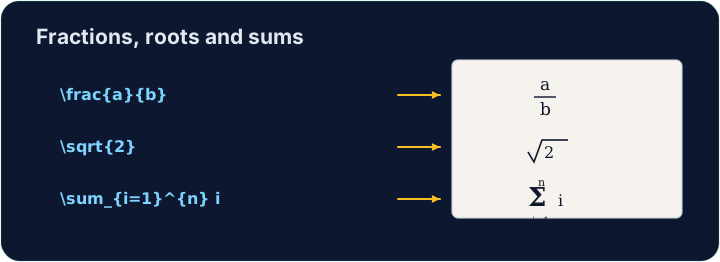
- A fraction is
\frac{top}{bottom}; a square root is\sqrt{...}:
- They nest happily:
\sqrt{\frac{1}{n}}is the square root of one-over-n.
עברית
שברים ושורשים
- שבר הוא
\frac{top}{bottom}; שורש ריבועי הוא\sqrt{...}:
\[ \frac{a + b}{2} \qquad \sqrt{x^2 + y^2} \]
- הם מתנשאים בצורה נוחה:
\sqrt{\frac{1}{n}}הוא השורש הריבועי של אחד-על-נ'.
English
Sums and integrals
- These grow to the right size automatically:
- The
_sets the lower limit and^the upper limit — the same keys as powers.
עברית
סכומים ואינטגרלים
- אלו גדלים לגודל הנכון באופן אוטומטי:
\[ \sum_{i=1}^{n} i \qquad \int_0^1 x^2 \, dx \]
- ה-
_קובע את הגבול התחתון וה-^את הגבול העליון — אותם מקשים כמו חזקות.
English
Common mistakes
\frac{a}{b},\sqrt{x}and\sumonly work in math mode.- Put them inside
$...$or\[ ... \].
עברית
טעויות נפוצות
\frac{a}{b},\sqrt{x}ו\sumעובדים רק במצב מתמטי.- הכנס אותם לתוך
$...$או\[ ... \].
Write a fraction in the display equation. Replace the comment with \frac{1}{2} so the equation reads one-half. The amsmath package is already loaded for you. · כתוב שבר במשוואת ההצגה. החלף את התגית עם \frac{1}{2} כך שהמשוואה תקרא חצי. חבילת הamsmath נטענת כבר עבורך.
Click Run to compile and preview the PDF. · לחץ הרצה כדי להרכיב ולהציג מראות את הקובץ.
Now use two more maths tools. In the display equation write a square root \sqrt{...} and a sum \sum, for example \[ \sqrt{2} + \sum_{i=1}^{n} i \]. · כעת השתמש בשני כלים נוספים במתמטיקה. בנוסחה מוצגת כתוב שורש \sqrt{...} וסיכום \sum, לדוגמה \[ \sqrt{2} + \sum_{i=1}^{n} i \].
Click Run to compile and preview the PDF. · לחץ הרצה כדי להרכיב ולהציג מראות את הקובץ.