Bold, italic and emphasis · טקסט מודגש, מוטה והדגשה
This page needs a recent browser (with SharedArrayBuffer support). Please update Chrome, Edge, Firefox or Safari to the latest version. · עמוד זה דורש דפדפן עדכני (תומך ב-SharedArrayBuffer). אנא עדכן את Chrome, Edge, Firefox או Safari לגרסה העדכנית ביותר.
English
Styling words
- To change how words look, you wrap them in a command:
\textbf= bold,\textit= italic,\texttt=code-like.
עברית
עיצוב מילים
- כדי לשנות את המראה של מילים, עטוף אותן בפקודה:
\textbf{bold} and \textit{italic} and \texttt{typewriter}
\textbf= דגוש,\textit= אלמיני,\texttt=code-like.
English
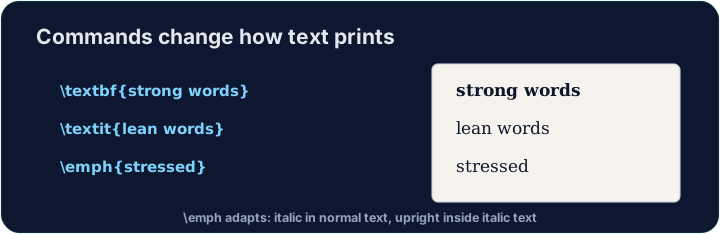
Emphasis the smart way
\emph{...}means "emphasise this" — usually italic, but it flips smartly inside italic text.- Prefer
\emphfor meaning, and\textitwhen you specifically want italic shapes.
עברית
הדגשה בדרך החכמה
\emph{...}פירושו "הדגש כאן" — בדרך כלל אלמיני, אך הוא משנה את עצמו באופן חכם בתוך טקסט already אלמיני.- העדיף
\emphעבור משמעות, ו\textitכאשר אתה רוצה במיוחד צורת אלמיני.
English
A note on quotes and dashes
- Type opening quotes with two backticks and closing with two apostrophes:
- A dash in a range is
--(en-dash, like 10--20); a pause in a sentence is---(em-dash). - These little touches are what make LaTeX documents look professional.
עברית
הערה על סימני הצטטות וקווים ארוכים
- כתוב סימני פתיחה עם שני מקשי backtick וסימני סיום עם שני סימני טרופי:
- קו באזור (range) הוא
--(en-dash, כמו 10--20); הפסקה במשפט היא---(em-dash). - נגיעות קטנות אלו הן מה שהופכות מסמכי LaTeX למראה מקצועי.
English
Common mistakes
\textbf{...}is bold,\textit{...}italic,\emph{...}emphasis.- Every opening brace
{needs a matching}.
עברית
טעויות נפוצות
\textbf{...}הוא מודגש,\textit{...}הוא במעטפת,\emph{...}הוא הדגשה.- לכל צומת פתיחה
{יש צומת סגירה}תואם.
Make the word important bold with \textbf{...}, and the word gently italic with \textit{...}. Then Run to see the styles. · הדגש את המילה important באמצעות \textbf{...}, והטל את המילה gently באמצעות \textit{...}. לאחר מכן לחץ על הפעל כדי לראות את הסגנונות.
Click Run to compile and preview the PDF. · לחץ הרצה כדי להרכיב ולהציג מראות את הקובץ.
Use the right tool for the job. Mark really with \emph{...} (emphasis that flips smartly), and show the file name report.tex in \texttt{...} (typewriter font). · בחר את הכלי המתאים למשימה. סמן really עם \emph{...} (הדגשה שמתחלפת חכמה), והצג את שם הקובץ report.tex ב\texttt{...} (גופן מכונת כתיבה).
Click Run to compile and preview the PDF. · לחץ הרצה כדי להרכיב ולהציג מראות את הקובץ.