Your first document · המסמך הראשון שלך
This page needs a recent browser (with SharedArrayBuffer support). Please update Chrome, Edge, Firefox or Safari to the latest version. · עמוד זה דורש דפדפן עדכני (תומך ב-SharedArrayBuffer). אנא עדכן את Chrome, Edge, Firefox או Safari לגרסה העדכנית ביותר.
English
Your first LaTeX document
- LaTeX lets you make beautiful documents — reports, books, and especially maths.
- You write plain text with commands, and the computer turns it into a polished PDF.
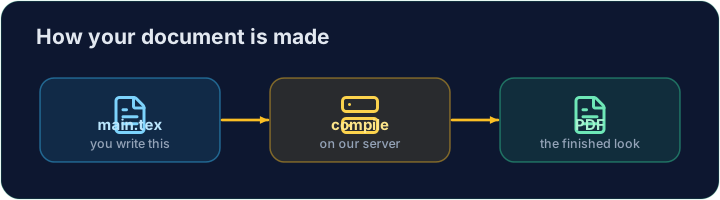
- Your LaTeX is compiled on our server — press Run and the PDF appears next to your code.
עברית
המסמך הראשון שלך ב-LaTeX
- LaTeX מאפשר לך ליצור מסמכים יפים — דוחות, ספרים, ובמיוחד מתמטיקה.
- אתה כותב טקסט רגיל עם פקודות, והמחשב ממיר אותו ל-PDF מעוצב.
- ה-LaTeX שלך מועבר לביצוע על השרת שלנו — לחץ על Run וה-PDF יופיע לצד הקוד שלך.
English
The shape of every document
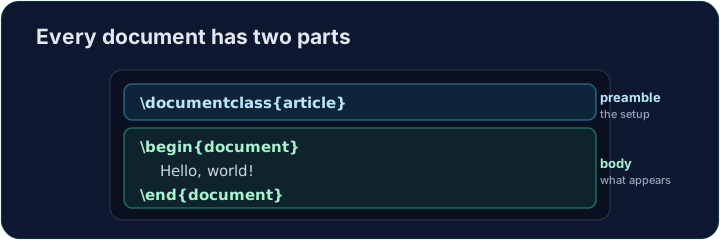
- Every document has two parts — a preamble and a body:
\documentclass{article}is the preamble: it sets the kind of document.- Everything between
\begin{document}and\end{document}is the body — the part that actually appears in the PDF.
עברית
מבנהו של כל מסמך
- לכל מסמך יש שני חלקים — קדימה (preamble) ו-גוף (body):
\documentclass{article}
\begin{document}
Hello, world!
\end{document}
\documentclass{article}היא ה-קדימה: היא מגדירה את סוג המסמך.- הכל בין
\begin{document}ל-\end{document}הוא ה-גוף — החלק שמופיע בפועל ב-PDF.
English
Now you try
- Below is a document skeleton. Add a greeting in the body.
- Press Run to compile it and see the PDF, then Check when you think it is right.
עברית
כעת תנסו בעצמכם
- להלן שלד מסמך. הוסף ברכה בגוף.
- לחץ על Run כדי לעבד אותו ולראות את ה-PDF, ולאחר מכן לחץ על Check כשאתה סבור שזה נכון.
English
Common mistakes
- A document needs
\documentclass{...}and a\begin{document} ... \end{document}. - The text you want to see goes inside the document environment.
עברית
טעויות נפוצות
- למסמך נדרשים
\documentclass{...}ו-\begin{document} ... \end{document}. - הטקסט שתרצה לראות נמצא בתוך הסביבה document.
The skeleton below is a complete LaTeX document. Replace the comment in the body with a greeting (any text containing the word Hello), then click Run to compile it and see the PDF. · השלד למטה הוא מסמך LaTeX מלא. החלף את התגובה בתוך הגוף בברכה (כל טקסט המכיל את המילה Hello), ולאחר מכן לחץ על הפעל כדי לרכוב אותו ולראות את הקובץ PDF.
Click Run to compile and preview the PDF. · לחץ הרצה כדי להרכיב ולהציג מראות את הקובץ.
Options in square brackets change the whole document. Make the text bigger by adding the [12pt] option: \documentclass[12pt]{article}. Run and see every letter grow. · אפשרויות בסוגריים מרובעים משנות את כל המסמך. הגדל את גודל הטקסט על ידי הוספת האפשרות [12pt]: \documentclass[12pt]{article}. הפעל וראה כל אות גדלה.
Click Run to compile and preview the PDF. · לחץ הרצה כדי להרכיב ולהציג מראות את הקובץ.