String handling
This page needs a recent browser (with SharedArrayBuffer support). Please update Chrome, Edge, Firefox or Safari to the latest version. · עמוד זה דורש דפדפן עדכני (תומך ב-SharedArrayBuffer). אנא עדכן את Chrome, Edge, Firefox או Safari לגרסה העדכנית ביותר.
English
LENGTH counts characters
LENGTH(s)gives how many characters are in a string.
עברית
LENGTH סופר תווים
LENGTH(s)נותן כמה תווים יש במחרוזת.
OUTPUT LENGTH("hello") // → 5
English
UCASE and LCASE change case
UCASE(s)makes a string all CAPITALS.LCASE(s)makes it all lower case.
עברית
UCASE ו-LCASE משנים מקרה אותיות
UCASE(s)הופך את המחרוזת כולה לאותיות גדולות.LCASE(s)הופך אותה כולה לאותיות קטנות.
OUTPUT UCASE("abc")       // → ABC
OUTPUT LCASE("HeLLo")     // → hello
English
SUBSTRING takes part of a string
SUBSTRING(s, start, length)copies part of a string.- The first character is position 1 (not 0).
עברית
SUBSTRING לוקח חלק ממחרוזת
SUBSTRING(s, start, length)מעתיק חלק ממחרוזת.- התווית הראשונה נמצאת ב-1 (ולא ב-0).
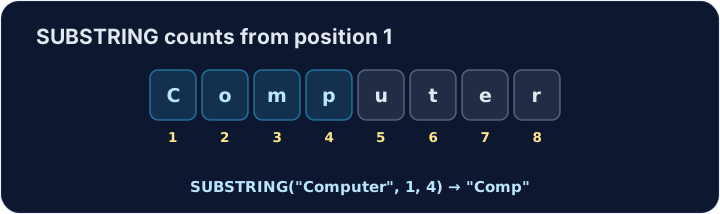
OUTPUT SUBSTRING("Computer", 1, 4) // → Comp
English
Printing several values
OUTPUTtakes several values separated by commas and prints them one after another.- The 0478 pseudocode has no "join" operator — a comma is how you put values side by side.
עברית
הדפסת ערכים רבים
OUTPUTמקבל מספר ערכים המופרדים ב-סימני פסיק והדפיס אותם אחד אחרי השני.- הסייברטקסט 0478 אינו כולל אופרטור "חיבור" — סימן פסיק הוא הדרך להציב ערכים זה לצד זה.
DECLARE Lives : INTEGER
Lives ← 3
OUTPUT "Cam", "bridge"        // → Cambridge
OUTPUT "You have ", Lives, " lives left"
English
Common mistakes
- Learn the exam's function names:
LENGTH,SUBSTRING,UCASE,LCASE. - String positions in pseudocode often start at
1, not0.
עברית
טעויות נפוצות
- למד את שמות הפונקציות במבחן:
LENGTH,SUBSTRING,UCASE,LCASE. - מיקומי מחרוזת בסייברטקסט מתחילים לעיתים קרובות ב-
1, ולא ב-0.
English
Now you try
- Use the string functions above.
- Press Check answer to test it.
עברית
כעת תנסו בעצמכם
- השתמש בפונקציות המחרוזת הנ
- לחץ על בדיקת תשובה כדי לבדוק אותה.
Read a word, then output how many characters it has with LENGTH. For input hello, output 5.
Click Run to see the output here. · לחץ על הרץ כדי לראות את התוצא כאן.
Read a word and output it in CAPITALS with UCASE. For input cat, output CAT.
Click Run to see the output here. · לחץ על הרץ כדי לראות את התוצא כאן.
Read a word and output its first 3 letters with SUBSTRING (start at 1, length 3). For input Computer, output Com.
Click Run to see the output here. · לחץ על הרץ כדי לראות את התוצא כאן.