Defending a system · הגנת מערכת
This page needs a recent browser (with SharedArrayBuffer support). Please update Chrome, Edge, Firefox or Safari to the latest version. · עמוד זה דורש דפדפן עדכני (תומך ב-SharedArrayBuffer). אנא עדכן את Chrome, Edge, Firefox או Safari לגרסה העדכנית ביותר.
English
Walls at the edge
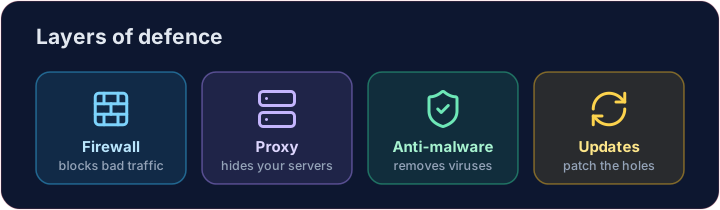
- A firewall sits between your network and the internet, blocking traffic that breaks the rules.
- A proxy server stands in front of your servers, hiding them and filtering requests.
- Together they keep unwanted visitors out before they reach anything important.
עברית
חומות בקצה
- חומת מגן (Firewall) ממוקמת בין הרשת שלך לאינטרנט, וחוסמת תנועה שפורת את הכללים.
- שרת פרוקסי עומד מול השרתים שלך, ומסתיר אותם ומסנן בקשות.
- יחד הם שומרים על מבקרים בלתי רצויים מחוץ לפני שהם מגיעים לדברים חשובים.
English
Software defences
- Anti-malware (anti-virus / anti-spyware) scans for and removes known malware.
- Automatic updates patch weaknesses as soon as fixes are released — most attacks use old, known holes.
עברית
הגנות תוכנה
- אנטי-מאלוויר (אנטי-וירוס / אנטי-ספייוואר) סורק ומסיר מאלוויר ידוע.
- עדכונים אוטומטיים תוקנים חוסר אבטחה ברגע שפתרונות מפורסמים — רוב ההתקפות משתמשות בנקודות חולשה ישנות ומוכרות.
English
Limiting the damage
- Access levels give each person only the rights they need — a student cannot change a teacher's grades.
- Privacy settings control who can see your data on a service.
- If one account is broken into, good access levels stop the attacker reaching everything.
עברית
הגבלת הנזק
- רמות גישה מעניקות לכל אדם רק את הזכויות שהן צריכות — סטודנט אינו יכול לשנות ציונים של מורה.
- הגדרות פרטיות בקרות מי יכול לראות את הנתונים שלך בשירות.
- אם חשבון אחד נפרץ, רמות גישה טובות מונעות מהמתקף להגיע לכל הדברים.
English
Smart habits
- Check the URL of a link before clicking, and the spelling and tone of messages.
- Look for HTTPS (the padlock) before entering a password — that is encryption at work, which we'll cover soon.
Covers: IGCSE 5.3 (solutions), A-Level 6.1 (security measures).
עברית
הרגלים חכמים
- בדוק את כתובת ה-URL של קישור לפני לחיצה, ואת האיות והטון של הודעות.
- חיפש HTTPS (סמל המנעולה) לפני הכנסת סיסמה — זהו הצפנה בפועל, שאנו נדון בה Soon.
מכסה: IGCSE 5.3 (פתרונות), A-Level 6.1 (אמצעי אבטחה).
English
Now you try
- First act as a firewall: let the allowed ports through and collect everything else in a blocked list.
- Then match each threat to the defence that stops it.
עברית
כעת תנסו בעצמכם
- פעל ראשית כחומת מגן: תן ליצוא יציאה למערכות הפתוחות המותרות ואסוף הכל האחר ברשימת חסום.
- לאחר מכן התאם כל איום להגנה שמניעה אותו.
English
Common mistakes
- Use layers: firewall, updates, anti-malware and backups.
- No single measure is enough — this is defence in depth.
עברית
טעויות נפוצות
- השתמש בשכבות: חומת מגן, עדכונים, אנטי-תוכנות זדוניות וגיבויים.
- אין אמצעי יחיד מספיק — זהו הגנה בעומק.
Act as a firewall. Only ports in allowed may pass. Build a list blocked of every requested port that is not allowed, and print it. · פעל כמערך חומה. רק יציאות (ports) הנמצאות בallowed יועברו. בנה רשימה blocked של כל היציאות הנבקשות שאינן מותרות, והדפס אותה.
Click Run to see the output here. · לחץ על הרץ כדי לראות את התוצא כאן.
Match each problem to the defence that stops it: anti-malware, updates or access levels. · התאם כל בעיה להגנה שעוצרת אותה: anti-malware, updates או access levels.
Click Run to see the output here. · לחץ על הרץ כדי לראות את התוצא כאן.