Using objects: String, Math, and wrappers · שימוש באובייקטים: String, Math ומעטפות (wrappers)
Using objects
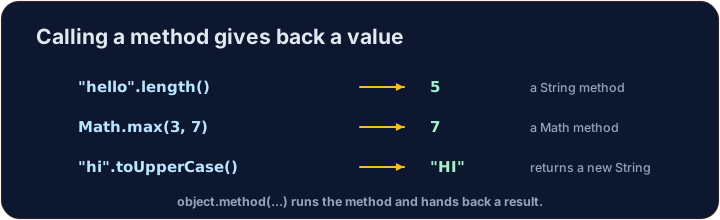
- An object is a value that knows how to do things. You call its methods with a dot
.. - A
Stringis an object.Math,Integer, andDoublegive you ready-made tools. - In this lesson you learn to make objects and use their methods.
שימוש באובייקטים
- אובייקט הוא ערך יודע לבצע פעולות. קוראים ל-שיטות שלו באמצעות נקודה
.. Stringהוא אובייקט.Math,Integerו-Doubleמספקים לך כלים מוכנים.- בשיעור זה תלמד ליצור אובייקטים ולהשתמש בשיטות שלהם.
Making objects with new
- Some objects are made with the keyword
newand a constructor. - A
Stringis special: you can write it directly with quotes, like"hi". - You can also make a separate
Stringobject withnew String("..."), but quotes are the normal way.
יצירת אובייקטים עם new
- חלק מאובייקטים נוצרים בעזרת המילית המפורשת
newו-constructor (בונה). Stringהוא מיוחד: ניתן לכתוב אותו ישירות עם סימני ציטוט, כמו"hi".- ניתן גם ליצור אובייקט
Stringנפרד עםnew String("..."), אך סימני ציטוט הם הדרך הרגילה.
public class Main {
    public static void main(String[] args) {
        String greeting = "Hello";
        String copy = new String("Hello");
        System.out.println(greeting);
        System.out.println(copy);
    }
}
String methods
s.length()— how many characters are ins.s.charAt(i)— the character at positioni(the first position is 0).s.substring(a, b)— the part fromaup to but not includingb.s.indexOf("x")— the first position of"x", or-1if not found.
שיטות String
s.length()— כמה תווים יש ב-s.s.charAt(i)— התווית במיקוםi(המיקום הראשון הוא 0).s.substring(a, b)— החלק מ-aועד אבל לא כוללb.s.indexOf("x")— המיקום הראשון של"x", או-1אם לא נמצא.
public class Main {
    public static void main(String[] args) {
        String word = "computer";
        System.out.println(word.length());        // 8
        System.out.println(word.charAt(0));        // c
        System.out.println(word.substring(0, 4));  // comp
        System.out.println(word.indexOf("put"));   // 3
    }
}
Comparing Strings
- Use
s.equals(other)to check if two Strings have the same letters. - Do not use
==to compare Strings — it can give the wrong answer. We learn why in lesson 3. s.compareTo(other)returns0when equal, a negative number ifscomes first in order, and a positive number if it comes later.
השוואת Strings
- השתמש ב
s.equals(other)כדי לבדוק אם לשני Strings יש את אותם אותיות. - אל תשתמש ב
==להשוואת Strings — זה עלול לתת תשובה שגויה. נלמד למה בשיעור 3. s.compareTo(other)מחזיר0כאשר שווים, מספר שלילי אםsמופיע ראשון בסדר, ומספר חיובי אם מופיע מאוחר יותר.
public class Main {
    public static void main(String[] args) {
        String a = "cat";
        String b = "cat";
        String c = "dog";
        System.out.println(a.equals(b));   // true
        System.out.println(a.equals(c));   // false
        System.out.println(a.compareTo(c)); // negative: "cat" is before "dog"
    }
}
Math methods
Mathholds math tools. You call them onMathitself, likeMath.abs(-5).Math.abs(x)— the size ofxwith no minus sign.Math.pow(b, e)—bto the powere(returns adouble).Math.sqrt(x)— the square root ofx(returns adouble).Math.random()— a randomdoublefrom0.0up to (not including)1.0.
מתודות מתמטיקה
Mathמכיל כלי מתמטיקה. קוראים אותם עלMathעצמו, כמו בMath.abs(-5).Math.abs(x)— הגודל שלxללא סימן מינוס.Math.pow(b, e)—bבחזקתe(מחזירdouble).Math.sqrt(x)— השורש הריבועי שלx(מחזירdouble).Math.random()— מספר אקראיdoubleמ0.0ועד (אך לא כולל)1.0.
public class Main {
    public static void main(String[] args) {
        System.out.println(Math.abs(-7));       // 7
        System.out.println(Math.pow(2, 3));     // 8.0
        System.out.println(Math.sqrt(9));       // 3.0
        // Math.random() changes each run, so we do not print it here.
    }
}
Wrappers and autoboxing
intanddoubleare simple types. Their object versions areIntegerandDouble.- Java can switch between them for you. This is called autoboxing.
Integer.parseInt("42")turns text into anint.Double.parseDouble("3.5")turns text into adouble.
Wrappers וautoboxing
intו-doubleהם סוגים פשוטים. הגרסאות שלהם כ-אובייקט הןIntegerו-Double.- Java יכול לעבור ביניהן עבורך. דבר זה נקרא autoboxing.
Integer.parseInt("42")ממיר טקסט לint.Double.parseDouble("3.5")ממיר טקסט לdouble.
public class Main {
    public static void main(String[] args) {
        Integer boxed = 10;        // int -> Integer (autoboxing)
        int back = boxed;          // Integer -> int (unboxing)
        int n = Integer.parseInt("42");
        double d = Double.parseDouble("3.5");
        System.out.println(back + n);   // 52
        System.out.println(d);          // 3.5
    }
}
Common mistakes
- Compare Strings (and other objects) with
.equals(), not==. Math.random()returns a value from0up to (but not including)1.
טעויות נפוצות
- השוו בין Strings (ובין שאר אובייקטים) באמצעות
.equals(), ולא==. Math.random()מחזיר ערך מ0ועד (אך לא כולל)1.
Now you try
- Each task pre-fills the class skeleton — write your code inside main, or complete the method shown.
- Press Run to compile and run, then Check answer.
- Your code compiles and runs on the server, so even the first run is fast.
כעת תנסו בעצמכם
- כל משימה ממלאת מראש את שלד המחלקה — כתוב את הקוד שלך בתוך main, או השלם את השיטה המוצגת.
- לחץ על Run כדי להרכיב ולהריץ, ולאחר מכן לחץ על Check answer.
- הקוד שלך נרכב ונרץ על השרת, ולכן גם ההפעלה הראשונה היא מהירה.
The String word is "programming". Print its length on the first line, then print the first 4 letters (use substring(0, 4)) on the second line. · המחרוזת word היא "programming". הדפיסו את אורכה בשורה הראשונה, ולאחר מכן הדפיסו את 4 האותיות הראשונות (השתמשו בsubstring(0, 4)) בשורה השנייה.
Click Run to see the output here. · לחץ על הרץ כדי לראות את התוצא כאן.
Complete hypotenuse(double a, double b) so it returns the length of the longest side of a right triangle: the square root of a*a + b*b. Use Math.sqrt and Math.pow (or a*a). · השלם hypotenuse(double a, double b) כך שיתחזיר את אורך הצלע הארוכה ביותר במשולש ישר-זווית: השורש הריבועי של a*a + b*b. השתמש בMath.sqrt ובMath.pow (או בa*a).
Click Run to see the output here. · לחץ על הרץ כדי לראות את התוצא כאן.
Complete sameWord(String a, String b) so it returns true when the two Strings have the same letters, and false otherwise. Use .equals (not ==). · השלימו את sameWord(String a, String b) כך שתחזיר את true כאשר לשתי המחרוזות אותו סדר אותיות, וfalse אחרת. השתמשו ב.equals (לא ב==).
Click Run to see the output here. · לחץ על הרץ כדי לראות את התוצא כאן.