The box model
This page needs a recent browser (with SharedArrayBuffer support). Please update Chrome, Edge, Firefox or Safari to the latest version.
Every box has layers
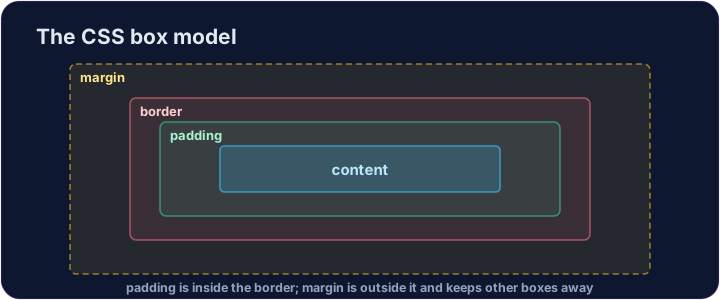
- CSS treats every element as a box.
- Content is your text or image. Padding is space inside, around the content.
- Border is a line around the padding. Margin is space outside, pushing other boxes away.
Padding and border
padding: 20px;adds 20 pixels of space inside, on all four sides.border: 2px solid black;draws a line — its width, style, then colour.- Padding makes a box feel roomy; a border makes it stand out.
<style>
  .card {
    background-color: #eef;
    padding: 16px;
    border: 2px solid #88a;
  }
</style>
<div class="card">A comfy padded card.</div>
Common mistakes
- The box model is content, then padding, then border, then margin (inside to outside).
- Padding adds space inside the border.
Now you try
- Padding is inside; the border sits around it.
- Add padding to a box, then a border.
Explore
The CSS box model
Every box is content + padding + border + margin around it.
Difficulty 2/5 · 140 coins + a small bonus on first completion today
Give the box some breathing room inside. Add padding: 20px; to the .box rule.
Difficulty 2/5 · 140 coins + a small bonus on first completion today
Draw a line around the box. Add border: 2px solid navy; to the .box rule — keep the three parts in that order: width, style, colour.