Images
This page needs a recent browser (with SharedArrayBuffer support). Please update Chrome, Edge, Firefox or Safari to the latest version.
Images
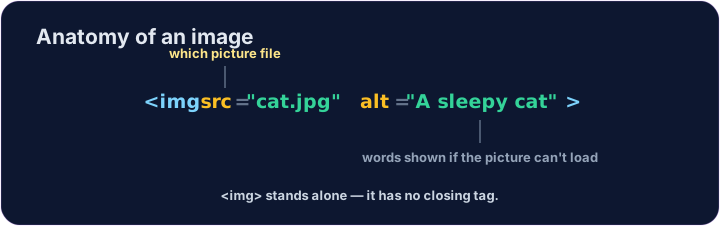
- Show a picture with the
<img>tag. <img>is a single tag — no closing tag, like<br>.- It needs two attributes:
src(where the picture is) andalt(a description).
<img src="/static/code/web-basics/cat.svg" alt="A cartoon cat">
Why alt text matters
altis text that describes the picture.- It shows if the image cannot load, and screen readers read it aloud.
- For an informative image, describe its meaning briefly. For a purely decorative image, use
alt=""so screen readers can skip it. Emptyaltand a missingaltare different.
Common mistakes
- Give the image
srcand analtappropriate to its purpose: meaningful text for information, or an empty value for decoration. <img>has no separate closing tag.
Now you try
- The picture lives at
/static/code/web-basics/cat.svg. - Show it, then add
alttext to an image.
Difficulty 1/5 · 100 coins + a small bonus on first completion today
Show the cat picture. Add an <img> with src="/static/code/web-basics/cat.svg".
Difficulty 1/5 · 100 coins + a small bonus on first completion today
This image has no description. Add an alt attribute that describes it, like alt="A cartoon cat".
Difficulty 1/5 · 100 coins + a small bonus on first completion today
The cat is a purely decorative flourish beside text that already gives the club information. Keep the image, but give it an empty alt value so screen readers can skip it.