Your first web page
This page needs a recent browser (with SharedArrayBuffer support). Please update Chrome, Edge, Firefox or Safari to the latest version.
Welcome to the web
- A web page is made with HTML.
- HTML is just text with tags around it.
- You write HTML here and watch it appear — nothing to install.
How this page works
- Type in the box, then press ▶ to see your page.
- Press ✓ Check to see if your task is correct.
- Stuck? Press 💡 for a hint. Press ↻ to start over.
- Read each step, then press Continue.
Tags wrap your words
- A tag is a word inside angle brackets, like
<p>. - Most tags come as a pair: an opening
<p>and a closing</p>. - A
<p>makes a paragraph — a block of text.
<p>Hello! This is my first web page.</p>
More than one paragraph
- Put each paragraph in its own pair of
<p>tags. - The browser shows them one after another, top to bottom.
<p>I am learning HTML.</p>
<p>This is fun.</p>
Common mistakes
- Tags go in angle brackets; the text you see goes between them.
- Most tags come in pairs, like
<p>...</p>.
Now you try
- Below are two small tasks. Type your HTML and press ▶ to see it.
- Press ✓ Check when you think it is right. You can try as many times as you like.
Explore
HTML is a tree of nodes
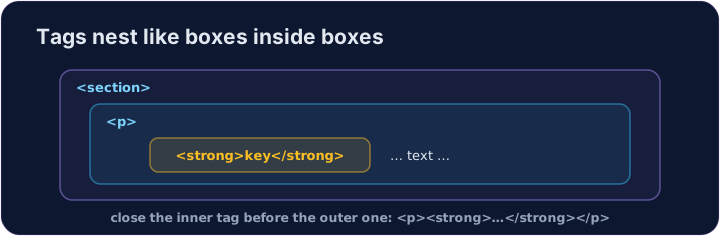
Tags nest inside tags — the browser builds a tree (the DOM).
Difficulty 1/5 · 100 coins + a small bonus on first completion today
Write a paragraph that says Hello, world! — type your text between the <p> and </p> tags.
Difficulty 1/5 · 100 coins + a small bonus on first completion today
Add a second paragraph below the first one. Make it say I made this. (Use a new pair of <p> … </p> tags.)