File permissions
Who can do what
- Every file has permissions that say who may read, write, or execute it.
ls -lshows them on the left of each line:
ls -l script.sh
- You see something like
-rwxr-xr-x. Read it in groups of three.
Reading the flags
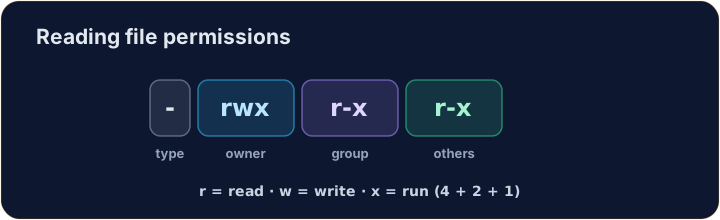
- The ten characters are: type, then owner, group, others:
-  rwx  r-x  r-x
file owner group others
r= read,w= write,x= execute,-= not allowed. So the owner here can do everything; others can read and run.
Changing permissions
chmodchanges the mode. Numbers are a quick way:r=4, w=2, x=1, added per group:
chmod 755 script.sh
7= 4+2+1 (rwx) for the owner;5= 4+1 (r-x) for group and others.755is the classic "runnable program".
Common mistakes
chmodsets read, write and execute for user, group and others.- On a real system, direct execution such as
./script.shneeds execute permission and a suitable interpreter.sh script.shinstead asks the shell to read the file, so the script itself needs read permission, not its execute bit. Our simulator displays modes but does not execute scripts.
File permissions (chmod)
Owner / group / others each get rwx — the octal is just those bits.
Difficulty 3/5 · 200 coins + a small bonus on first completion today
Make script.sh runnable by giving it permissions 755 with chmod 755 script.sh. The check shows ls -l so you can see the new rwx flags.
Difficulty 3/5 · 200 coins + a small bonus on first completion today
secret.key holds a private key, so ordinary group members and other users should have no read access. Give it permission 600 with chmod 600 secret.key — owner read+write, group and others nothing.
Difficulty 3/5 · 200 coins + a small bonus on first completion today
Share report.txt with your project group. The owner needs read and write; the group needs read only; other users need no access. Choose the numeric mode and set it with chmod.