Sorting and columns
This page needs a recent browser (with SharedArrayBuffer support). Please update Chrome, Edge, Firefox or Safari to the latest version.
Putting lines in order
sortarranges lines alphabetically (or, with-n, as numbers):
sort names.txt
sort -rreverses the order;sort -nis for lists of numbers.
Removing duplicates
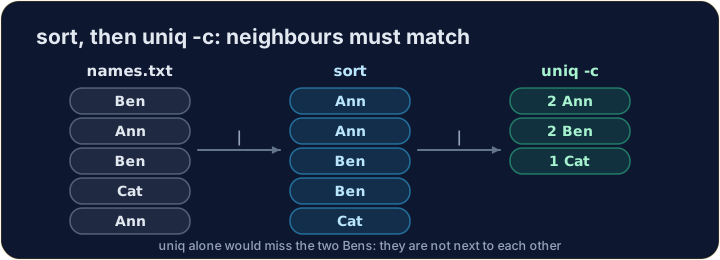
uniqremoves neighbouring repeated lines. Because it only looks at neighbours, you usuallysortfirst:
sort names.txt | uniq
- Add
uniq -cto also count how many times each line appeared.
Explore
sort, then uniq
uniq only sees neighbours — sort first, so the duplicates sit together.
Picking out columns
- Many files have columns separated by a character — a comma, a colon, a tab.
cutpulls out the columns you want.-dsets the delimiter,-fthe field:
cut -d : -f 1 people.txt
- That takes the first field of each
name:ageline — the names.
Common mistakes
sortis alphabetical;sort -nsorts numbers correctly.cutneeds the right delimiter with-d.
Difficulty 3/5 · 200 coins + a small bonus on first completion today
Get a tidy, de-duplicated list of names. Pipe sort into uniq: sort names.txt | uniq.
Difficulty 3/5 · 200 coins + a small bonus on first completion today
people.txt has name:age on each line. Pull out just the names with cut -d : -f 1 people.txt.