Moving around
This page needs a recent browser (with SharedArrayBuffer support). Please update Chrome, Edge, Firefox or Safari to the latest version.
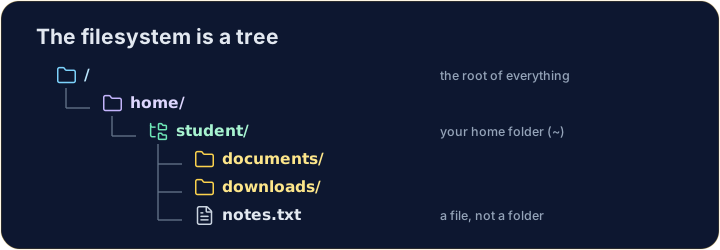
The filesystem is a tree
- Folders (called directories) hold files and other folders, like branches on a tree.
- The very top is
/, the root. Your personal folder is your home, written~.
Looking and moving
lslists what is in the current folder.cdchanges directory — it moves you into a folder:
ls
cd documents
- After
cd documents, you are inside documents. Runpwdany time to check where you are.
Handy shortcuts
cd ..goes up one level (to the parent folder).cdwith nothing, orcd ~, jumps straight back to your home.- A path can be relative (
documents/work) or absolute (starts with/, like/home/student).
Common mistakes
cdwith no argument goes to your home folder;cd ..goes up one level.pwdshows the folder you are in.
Explore
Moving around the tree
The filesystem is one tree; an absolute path is the trail from /.
Difficulty 1/5 · 100 coins + a small bonus on first completion today
Use ls (list) to see what is in your home folder.
Difficulty 1/5 · 100 coins + a small bonus on first completion today
Move into the documents folder with cd documents, then run pwd to prove you are there.