Tables
This page needs a recent browser (with SharedArrayBuffer support). Please update Chrome, Edge, Firefox or Safari to the latest version.
Tables
- A table uses the
tabularenvironment. You first describe the columns:
\begin{tabular}{l c r}
  left & centre & right \\
\end{tabular}
{l c r}means three columns: left-aligned, centred, right-aligned.
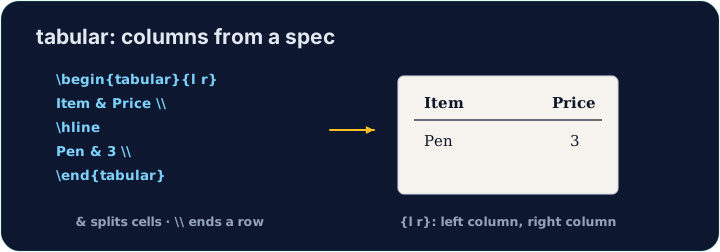
Rows and cells
- Inside,
&jumps to the next column and\\starts a new row:
\begin{tabular}{l l}
  Apple & 5 \\
  Banana & 3 \\
\end{tabular}
- The number of cells in each row must match the number of columns you declared.
Lines (optional)
- Add
|between column letters for vertical lines, and\hlinefor horizontal ones:
\begin{tabular}{|l|l|}
  \hline
  Apple & 5 \\ \hline
\end{tabular}
- For a cleaner look, professionals use the
booktabspackage instead of many lines.
Common mistakes
tabularneeds a column spec like{lcr}; separate cells with&and end rows with\\.- The number of
&per row must fit the column spec.
Difficulty 2/5 · 140 coins + a small bonus on first completion today
Build a small two-column table with \begin{tabular}{l l}. Separate the two cells in a row with &, and end each row with \\. Add the rows for Bob (30) and Mei (25).
Click Run to compile and preview the PDF.
Difficulty 2/5 · 140 coins + a small bonus on first completion today
Add lines to the table. Put \hline at the top, after the header row, and at the bottom, and use |l|l| in the column spec for vertical lines.
Click Run to compile and preview the PDF.