Bulleted and numbered lists
This page needs a recent browser (with SharedArrayBuffer support). Please update Chrome, Edge, Firefox or Safari to the latest version.
Bulleted lists
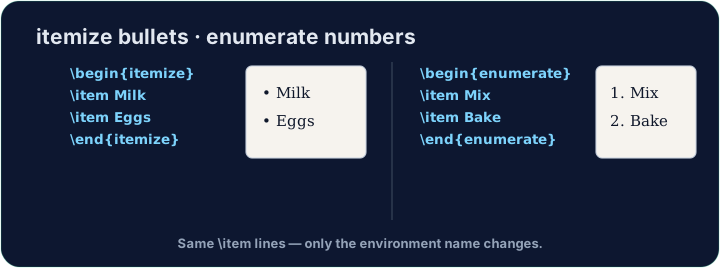
- A bulleted list is an environment — it opens with
\beginand closes with\end:
\begin{itemize}
  \item First thing
  \item Second thing
\end{itemize}
- Every entry starts with
\item. The bullets and spacing are handled for you.
Numbered lists
- Want 1, 2, 3 instead of bullets? Use
enumerate— everything else is the same:
\begin{enumerate}
  \item Wake up
  \item Have breakfast
\end{enumerate}
- The numbers are automatic, so you can reorder items freely.
Lists inside lists
- Put a list inside an
\itemto make sub-points. LaTeX indents them and changes the bullet style. - Now try turning a few lines into a tidy bulleted list.
Common mistakes
- Text before the first
\item. LaTeX stops with! LaTeX Error: Something's wrong--perhaps a missing \item. - Closing with the wrong name.
\begin{itemize}...\end{enumerate}gives! LaTeX Error: \begin{itemize} on input line 3 ended by \end{enumerate}.The message names the line where the list began. - A blank line for a new bullet. It only starts a new paragraph inside the same bullet. Every entry needs its own
\item.
Difficulty 1/5 · 100 coins + a small bonus on first completion today
Turn the three foods into a bulleted list. Wrap them in \begin{itemize} … \end{itemize} and put \item before each one.
Click Run to compile and preview the PDF.
Difficulty 1/5 · 100 coins + a small bonus on first completion today
Order matters here, so use a numbered list. Wrap the three steps in \begin{enumerate} … \end{enumerate} with an \item before each. LaTeX numbers them 1, 2, 3 for you.
Click Run to compile and preview the PDF.
Difficulty 1/5 · 100 coins + a small bonus on first completion today
Lists can sit inside lists. Under the item Fruit, add an inner itemize with the two items Apple and Pear. LaTeX changes the bullet for the inner level.
Click Run to compile and preview the PDF.