Your first document
Your first LaTeX document
- LaTeX lets you make beautiful documents — reports, books, and especially maths.
- You write plain text with commands, and the computer turns it into a polished PDF.
- Your LaTeX is compiled on our server — press Run and the PDF appears next to your code.
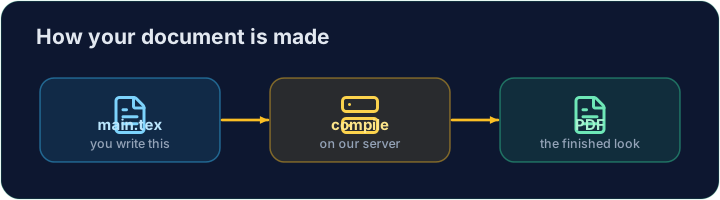
The shape of every document
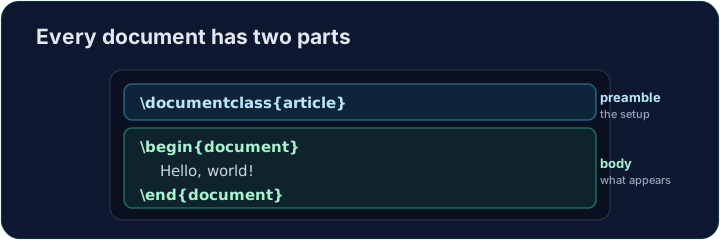
- Every document has two parts — a preamble and a body:
\documentclass{article}
\begin{document}
Hello, world!
\end{document}
\documentclass{article}is the preamble: it sets the kind of document.- Everything between
\begin{document}and\end{document}is the body — the part that actually appears in the PDF.
Now you try
- Below is a document skeleton. Add a greeting in the body.
- Press Run to compile it and see the PDF, then Check when you think it is right.
Common mistakes
-
Text before
\begin{document}. Only settings go in the preamble. LaTeX stops with! LaTeX Error: Missing \begin{document}. -
A bare
&or%in your text.&gives! Misplaced alignment tab character &.;%gives no error but hides the rest of the line, because it starts a comment. Write\&and\%. -
Reading the last error first. One mistake can cause many messages. Fix the first line that starts with
!, then run again. -
Check looks for the requested source constructs. Run compiles the document and previews it; use Run to catch TeX errors and inspect the result.
Difficulty 1/5 · 100 coins + a small bonus on first completion today
The skeleton below is a complete LaTeX document. Replace the comment in the body with a greeting (any text containing the word Hello), then click Run to compile it and see the PDF.
Difficulty 1/5 · 100 coins + a small bonus on first completion today
Options in square brackets change the whole document. Make the text bigger by adding the [12pt] option: \documentclass[12pt]{article}. Run and see every letter grow.
Difficulty 1/5 · 100 coins + a small bonus on first completion today
Some characters are commands in LaTeX. % starts a comment, so the rest of this line vanishes. Escape the two special characters with a backslash: write 50\% and \&.