Bubble sort
This page needs a recent browser (with SharedArrayBuffer support). Please update Chrome, Edge, Firefox or Safari to the latest version.
Put the smallest time first
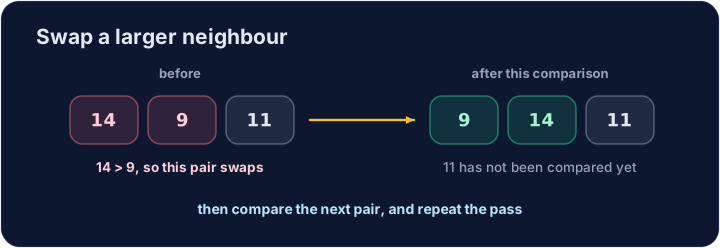
- Three race times sit in an array:
14,9,11. The smallest should come first. - Compare each pair of neighbours. When the left one is larger, swap them.
- That single comparison does not finish the list. The next pair is compared after it.
DECLARE Score : ARRAY[1:3] OF INTEGER
DECLARE J, Temp : INTEGER
Score[1] ← 14
Score[2] ← 9
Score[3] ← 11
FOR J ← 1 TO 2
    IF Score[J] > Score[J + 1]
      THEN
        Temp ← Score[J]
        Score[J] ← Score[J + 1]
        Score[J + 1] ← Temp
    ENDIF
NEXT J
OUTPUT Score[1]
OUTPUT Score[2]
OUTPUT Score[3]
Repeat the pass
- One pass of the inner loop bubbles the largest value it sees toward the end.
- The outer loop repeats the pass. For four values, three passes are enough.
- This is the syllabus's bubble sort. A linear search, which you wrote earlier, only looks. A sort rearranges.
DECLARE Score : ARRAY[1:4] OF INTEGER
DECLARE I, J, Temp : INTEGER
Score[1] ← 4
Score[2] ← 1
Score[3] ← 3
Score[4] ← 2
FOR I ← 1 TO 3
    FOR J ← 1 TO 3
        IF Score[J] > Score[J + 1]
          THEN
            Temp ← Score[J]
            Score[J] ← Score[J + 1]
            Score[J + 1] ← Temp
        ENDIF
    NEXT J
NEXT I
OUTPUT Score[1]
OUTPUT Score[2]
OUTPUT Score[3]
OUTPUT Score[4]
Watch out
- Swap with a
Tempvariable.Score[J] ← Score[J + 1]alone deletes the left value. - The inner
NEXTnamesJ. The outerNEXTnamesI.
Common mistakes
- The test is "left is greater", so the smaller value moves left. The other way sorts into reverse order.
- Arrays in this course count from 1. The last pair is the cell just before the end, and the last cell.
Now you try
- The first task is one pass. The second is the full sort. Output each value on its own line.
- Press Check answer to test it.
The array Score holds 14, 9, 11. Make one pass that swaps a neighbour when the left value is larger. Output the three values, one per line (9, then 11, then 14).
Click Run to see the output here.
The array Score holds 4, 1, 3, 2. Bubble-sort it into ascending order and output the four values, one per line.
Click Run to see the output here.