HTTPS, SSL/TLS and certificates
HTTPS protects the connection
- HTTPS protects the connection to the named website with encryption and integrity checks. Browsers use different connection indicators; some no longer show a padlock.
- The "S" stands for Secure. It uses a protocol called TLS (the modern version of SSL).
How the secure connection is set up
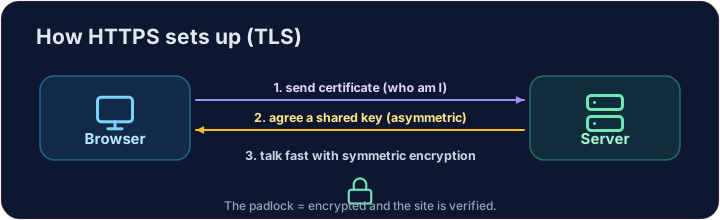
- TLS cleverly combines both kinds of encryption you have learned:
- In a typical certificate-based connection, public-key techniques authenticate the server and establish shared keys.
- Symmetric encryption protects application data, such as the page and your submitted text.
- The diagram shows three concepts, not the exact order of TLS packets. TLS 1.3 can exchange key shares in the hello messages and encrypt later handshake messages before the certificate is sent.
How do you know the site is real?
- Encryption alone does not establish that you reached the intended domain. Digital certificates help authenticate the domain named in the address.
- A website's certificate is issued by a trusted Certificate Authority (CA) and signed with the CA's key.
- The browser checks the requested domain, a trusted certificate chain, the validity period and other certificate rules. A valid signature alone is insufficient.
Putting it together
- Certificate validation authenticates the named domain. TLS protects data on the connection.
- A phishing site can have a valid certificate for its own deceptive domain. Check the address you intended to visit; HTTPS does not prove the operator is honest. Do not enter passwords over HTTP or bypass certificate warnings.
Covers: IGCSE 5.3 (SSL), A-Level 17.1 (SSL/TLS, digital certificates).
Now you try
- First arrange the simplified teaching phases. They are not an exact TLS 1.3 message trace.
- Then implement a simplified certificate check and try mismatched names, untrusted chains and invalid dates.
Common mistakes
- HTTPS protects the connection to a validated domain; it does not certify the site's content or honesty.
- A certificate warning is a real warning — do not click through it.
The TLS handshake
Distinguish domain authentication, key agreement and protection of application data.
Difficulty 3/5 · 200 coins + a small bonus on first completion today
Arrange these simplified teaching phases in the order used in the lesson: hello, certificate, key exchange, secure data. Fill order. This is a conceptual model, not an exact TLS 1.3 packet sequence.
Click Run to see the output here.
Difficulty 3/5 · 200 coins + a small bonus on first completion today
Write certificate_ok(site, name, trusted_chain, in_validity_period). In this simplified model, return True only when the certificate name matches the requested site AND both Boolean checks are True. For example, ("my-bank.com", "my-bank.com", True, False) must return False. This does not test whether a website is honest.
Click Run to see the output here.