Hashing and digital signatures
This page needs a recent browser (with SharedArrayBuffer support). Please update Chrome, Edge, Firefox or Safari to the latest version.
Hashing protects integrity
- We hashed passwords for secrecy. Hashing also protects integrity — proving data was not changed.
- Change even one character of the input, and the hash changes completely.
import hashlib
print(hashlib.sha256(b"hello").hexdigest()[:16])
print(hashlib.sha256(b"hellp").hexdigest()[:16])   # totally different
Checking a download
- Websites publish the hash of a file. After downloading, you hash your copy and compare.
- If the two hashes match, the file arrived intact. If not, it was corrupted or tampered with.
Digital signatures
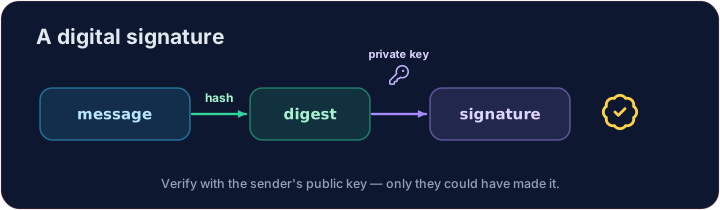
- A digital signature proves who sent something and that it was not changed.
- The sender hashes the message and encrypts that hash with their private key.
- Anyone can check it with the sender's public key — only the real sender could have made it.
Your turn
- Compare the hashes of an original and a received message.
Truemeans the message is intact.
Covers: A-Level 17.1 (digital certification), 6.2 (integrity).
Common mistakes
- A hash is one-way — you cannot get the original back from it.
- A digital signature proves who sent a message and that it was not changed.
Explore
Hashing & signatures
A hash is one-way and avalanches — perfect for fingerprints.
Difficulty 4/5 · 280 coins + a small bonus on first completion today
Check whether a received message is unchanged. Hash both original and received with SHA-256 and print whether the two digests are equal (True or False).
Click Run to see the output here.
Difficulty 4/5 · 280 coins + a small bonus on first completion today
This time an attacker edited the message in transit. Hash both versions and print TAMPERED if the digests differ, else OK — one changed character is enough to catch.
Click Run to see the output here.