Writing a class: fields, constructor, methods
This page needs a recent browser (with SharedArrayBuffer support). Please update Chrome, Edge, Firefox or Safari to the latest version.
Make your own type
- So far you used classes like
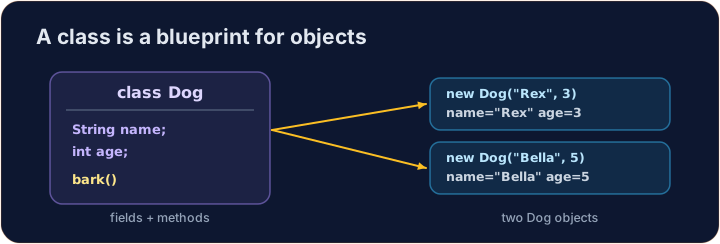
StringandMaththat Java gave you. - Now you will write your own class. A class is a plan for an object.
- An object holds data (its own values) and methods (things it can do).
Instance variables
- Data that each object keeps is stored in instance variables (also called fields).
- You declare them inside the class, but outside any method.
- Each object gets its own copy of these variables.
public class Dog {
    String name;   // instance variable
    int age;       // instance variable
}
A constructor
- A constructor sets up a new object. It runs when you write
new. - It has the same name as the class and no return type (not even
void). - Use the word
thisto mean "this object's own variable".
public class Dog {
    String name;
    int age;

    // Constructor: runs when we make a new Dog
    public Dog(String name, int age) {
        this.name = name;   // this.name is the field; name is the parameter
        this.age = age;
    }
}
Instance methods
- An instance method is an action an object can do.
- It can read and change the object's own instance variables.
- You call it on an object with a dot:
myDog.speak().
public class Dog {
    String name;
    int age;

    public Dog(String name, int age) {
        this.name = name;
        this.age = age;
    }

    // Instance method: returns a sentence about this dog
    public String describe() {
        return this.name + " is " + this.age;
    }
}
Make and use an object
- Use
new ClassName(...)to build an object. This calls the constructor. - Store it in a variable whose type is the class name.
- Then call its methods with a dot.
public class Main {
    public static void main(String[] args) {
        Dog d = new Dog("Rex", 4);
        System.out.println(d.describe());   // Rex is 4
    }
}

class Dog {
    String name;
    int age;

    public Dog(String name, int age) {
        this.name = name;
        this.age = age;
    }

    public String describe() {
        return this.name + " is " + this.age;
    }
}
Why this?
- A parameter and a field can have the same name (like
name). - Inside the constructor,
namemeans the parameter;this.namemeans the field. thisalways means the object the method was called on.
Common mistakes
- A constructor has no return type and matches the class name.
- Use
this.fieldto tell a field from a parameter of the same name.
Now you try
- Each task gives you a class skeleton with a TODO. Fill it in so it compiles and works.
- A hidden Harness builds your object and checks the results.
- Use Check answer to compile your code with the supplied tests and view the results. Keep the class and method interfaces shown in the starter.
Difficulty 2/5 · 140 coins + a small bonus on first completion today
Complete the Counter class. It has an int field count that starts at 0. increment() adds 1 to it. getCount() returns the current value.
Click Run to see the output here.
Difficulty 2/5 · 140 coins + a small bonus on first completion today
Complete the Rectangle class. The constructor takes width w and height h and stores them. area() returns width times height. perimeter() returns 2 times (width plus height).
Click Run to see the output here.
Difficulty 2/5 · 140 coins + a small bonus on first completion today
Complete the Greeter class. The constructor takes a String name and stores it in the field name. greet() returns the text Hello, followed by the name and a ! (for "Ana" it returns Hello, Ana!).
Click Run to see the output here.