HTTPS, SSL/TLS and certificates · HTTPS وSSL/TLS والشهادات
The padlock in your browser
- When you see HTTPS and a padlock, your connection to the website is encrypted.
- The "S" stands for Secure. It uses a protocol called TLS (the modern version of SSL).
القفل في متصفحك
- عندما ترى HTTPS وقفلاً، فإن اتصالك بالموقع مشفر.
- الحرف "S" يرمز إلى آمن. يستخدم بروتوكولاً يسمى TLS (الإصدار الحديث لـ SSL).
How the secure connection is set up
- TLS cleverly combines both kinds of encryption you have learned:
- It uses asymmetric encryption to safely agree on a shared secret key.
- Then it switches to fast symmetric encryption for the rest of the conversation.
- This "handshake" happens in a fraction of a second, before any page loads.
كيفية إعداد الاتصال الآمن
- TLS يجمع ببراعة بين نوعي التشفير اللذين تعلمتهما:
- يستخدم التشفير غير المتماثل للاتفاق بأمان على مفتاح سري مشترك.
- ثم ينتقل إلى التشفير المتماثل السريع لباقي المحادثة.
- يحدث هذا "المصافحة" في جزء من الثانية، قبل تحميل أي صفحة.
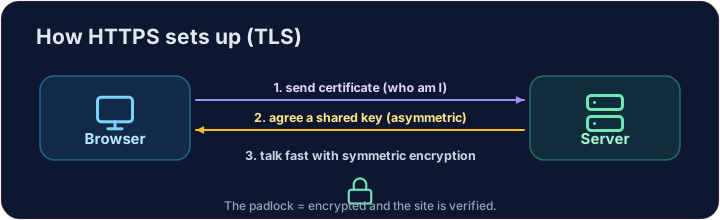
How do you know the site is real?
- Encryption is useless if you are talking to an impostor. That is what digital certificates solve.
- A website's certificate is issued by a trusted Certificate Authority (CA) and signed with the CA's key.
- Your browser checks the signature. If it is valid, you know the site is who it claims to be.
كيف تعرف أن الموقع حقيقي؟
- التشفير بلا فائدة إذا كنت تتحدث مع مُتصوّر. وهذا ما تحلّه الشهادات الرقمية.
- تُصدر شهادة الموقع بواسطة جهة إصدار شهادات موثوقة (CA) وتُوقَع بمفتاح الـ CA.
- يتحقق متصفحك من التوقيع. إذا كان صحيحاً، فأنت تعلم أن الموقع هو من يدعي أنه عليه.
Putting it together
- Certificate → proves who the site is. TLS → keeps the conversation secret.
- That tiny padlock means: encrypted, and verified. No padlock on a login page? Walk away.
Covers: IGCSE 5.3 (SSL), A-Level 17.1 (SSL/TLS, digital certificates).
دمج العناصر معاً
- الشهادة → تثبت من الموقع هو. TLS → يحافظ على سرية المحادثة أينما كانت.
- ذلك القفل الصغير يعني: مشفر ومُتحقق منه. لا يوجد قفل في صفحة تسجيل الدخول؟ ابتعد عن الموقع.
يغطي: IGCSE 5.3 (SSL)، A-Level 17.1 (SSL/TLS، الشهادات الرقمية).
Now you try
- First put the four handshake steps in the right order — the exam loves this sequence.
- Then be the browser: look at a certificate's details and decide whether to trust it.
الآن جرب بنفسك
- أولاً رتب خطوات المصافحة الأربع بالترتيب الصحيح — امتحانات الاختبار تحب هذا التسلسل.
- ثم كن المتصفح: انظر إلى تفاصيل الشهادة وقرر ما إذا كنت ستثق بها.
Common mistakes
- HTTPS encrypts the traffic; the certificate proves the site's identity.
- A certificate warning is a real warning — do not click through it.
أخطاء شائعة
- HTTPS يشفر حركة المرور؛ والشهادة تثبت هوية الموقع.
- تحذير الشهادة هو تحذير حقيقي — لا تمرر فوقَه.
The TLS handshake · المصافحة مع TLS
HTTPS sets up a secure channel before any data is sent. · يحدد HTTPS قناة آمنة قبل إرسال أي بيانات.
Put the TLS handshake in order. Fill the list order with the four steps, first to last: hello, certificate, key exchange, secure data. · رتّب عملية تبادل مفاتيح TLS. املأ القائمة order بالخطوات الأربعة، من الأول إلى الأخير: hello، certificate، key exchange، secure data.
Click Run to see the output here. · اضغط تشغيل لرؤية المخرجات هنا.
Be the browser. Trust the certificate only if the name matches the site you asked for, the issuer is trusted, AND it has not expired (expires ≥ 2026). Print valid or invalid. · كن المتصفح. وثّق الشهادة فقط إذا تطابق name مع site الذي طلبته، وأن المصدّر موثوق، AND لم تنتهِ صلاحيته (expires ≥ 2026). اطبع valid أو invalid.
Click Run to see the output here. · اضغط تشغيل لرؤية المخرجات هنا.