Access control and least privilege
此页面需较新浏览器(支持 SharedArrayBuffer)。请升级 Chrome、Edge、Firefox 或 Safari 至最新版本。
最小权限
- 一条核心的安全准则:只给每个人和每个程序他们所需要的访问权限 —— 不多给。
- 一旦某个账户被攻破,最小权限意味着攻击者能触及的东西更少。
文件上的访问控制
- 在 Linux 上,文件权限正是访问控制的体现(你在 Linux 课程里见过它们)。
ls -l会显示对所有者、用户组和其他所有人来说,谁可以读(r)、写(w)和执行(x)。
ls -l secret.txt
锁定一个机密
- 存放密码或密钥的文件,应当只对它的所有者可读。
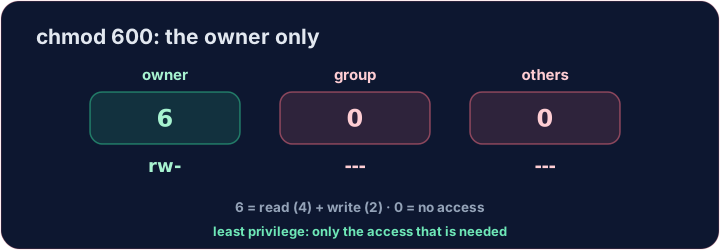
chmod 600给所有者读 + 写权限,而对其他任何人什么都不给:
chmod 600 secret.txt
6= 所有者拥有读+写权限;0和0= 所属组及其他用户均无访问权限。
轮到你了
- 锁定
secret.txt,让只有它的所有者才能碰它。良好的权限设置是一种简单而强大的防御。
涵盖:A-Level 6.1(访问级别 / 安全措施)。
常见错误
- 只给每个用户所需的权限(最小权限)。
- 不要用管理员账户做日常工作。
探索
Least privilege
Give each user only the rwx they need — nothing more.
难度 3/5 · 今日首次完成可获 200 金币及少量额外奖励
secret.txt is currently readable by everyone. Lock it down so only its owner can read and write it, with chmod 600 secret.txt. The check shows ls -l.
难度 3/5 · 今日首次完成可获 200 金币及少量额外奖励
Least privilege is not always 600. Your team should read team-notes.txt, but not change it — and outsiders get nothing. Use chmod 640 team-notes.txt (6 = owner read+write, 4 = group read-only, 0 = others none).
难度 3/5 · 今日首次完成可获 200 金币及少量额外奖励
backup.sh is a script only you should run, read or change. Give the owner read, write and execute, and everyone else nothing: chmod 700 backup.sh (7 = 4 + 2 + 1).