HTTPS, SSL/TLS and certificates · HTTPS、SSL/TLS 与证书
This page needs a recent browser (with SharedArrayBuffer support). Please update Chrome, Edge, Firefox or Safari to the latest version. · 此页面需较新浏览器(支持 SharedArrayBuffer)。请升级 Chrome、Edge、Firefox 或 Safari 至最新版本。
English
The padlock in your browser
- When you see HTTPS and a padlock, your connection to the website is encrypted.
- The "S" stands for Secure. It uses a protocol called TLS (the modern version of SSL).
中文
浏览器里的那把小锁
- 当你看到 HTTPS 和一把小锁时,你与网站之间的连接是加密的。
- 那个 “S” 代表 Secure(安全)。它使用一种叫 TLS 的协议(也就是 SSL 的现代版本)。
English
How the secure connection is set up
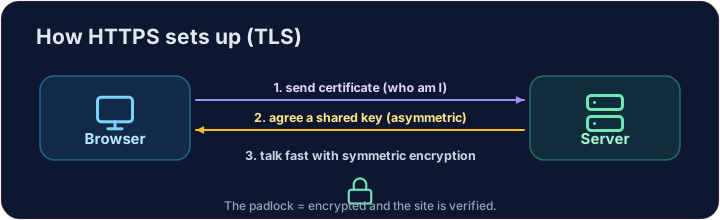
- TLS cleverly combines both kinds of encryption you have learned:
- It uses asymmetric encryption to safely agree on a shared secret key.
- Then it switches to fast symmetric encryption for the rest of the conversation.
- This "handshake" happens in a fraction of a second, before any page loads.
中文
这条安全连接是如何建立的
- TLS 巧妙地把你学过的两种加密结合在一起:
- 它用非对称加密来安全地商定一把共享的密钥。
- 然后切换到快速的对称加密,用于其余的通信。
- 这次“握手”在不到一秒内完成,发生在任何页面加载之前。
English
How do you know the site is real?
- Encryption is useless if you are talking to an impostor. That is what digital certificates solve.
- A website's certificate is issued by a trusted Certificate Authority (CA) and signed with the CA's key.
- Your browser checks the signature. If it is valid, you know the site is who it claims to be.
中文
你怎么知道这个网站是真的?
- 如果你其实在和一个冒名顶替者对话,加密就毫无意义。这正是数字证书要解决的问题。
- 网站的证书由一个受信任的**证书颁发机构(CA)**签发,并用 CA 的密钥签名。
- 你的浏览器会检查这个签名。如果有效,你就知道该网站确实是它所声称的那个。
English
Putting it together
- Certificate → proves who the site is. TLS → keeps the conversation secret.
- That tiny padlock means: encrypted, and verified. No padlock on a login page? Walk away.
Covers: IGCSE 5.3 (SSL), A-Level 17.1 (SSL/TLS, digital certificates).
中文
把它们串起来
- 证书 → 证明网站是谁。TLS → 让通信保持保密。
- 那把小锁意味着:已加密,且已验证。登录页面上没有小锁?那就赶紧离开。
涵盖:IGCSE 5.3(SSL)、A-Level 17.1(SSL/TLS、数字证书)。
English
Now you try
- First put the four handshake steps in the right order — the exam loves this sequence.
- Then be the browser: look at a certificate's details and decide whether to trust it.
中文
现在你来试
- 先把握手的四个步骤按正确顺序排好 —— 考试特别爱考这个顺序。
- 然后扮演浏览器:查看一张证书的信息,判断要不要信任它。
English
Common mistakes
- HTTPS encrypts the traffic; the certificate proves the site's identity.
- A certificate warning is a real warning — do not click through it.
中文
常见错误
- HTTPS 加密流量;证书证明网站的身份。
- 证书警告是真正的警告——不要无视点过去。
Explore · 探索
The TLS handshake · TLS 握手
HTTPS sets up a secure channel before · 在...之前 any data is sent. · HTTPS 在发送任何数据之前先建立安全通道。
Put the TLS handshake in order. Fill the list order with the four steps, first to last: hello, certificate, key exchange, secure data. · 把 TLS 握手排好顺序。把四个步骤按从先到后填进列表 order:hello、certificate、key exchange、secure data。
Click Run to see the output here. · 点击“运行”查看此处输出。
Be the browser. Trust the certificate only if the name matches the site you asked for, the issuer is trusted, AND it has not expired (expires ≥ 2026). Print valid or · 或 invalid. · 扮演浏览器。只有当证书的 name 与你访问的 site 一致、签发机构可信、且未过期(expires ≥ 2026)时才信任它。打印 valid 或 invalid。
Click Run to see the output here. · 点击“运行”查看此处输出。