Asymmetric encryption · 非对称加密
Two keys instead of one
- Symmetric encryption has a problem: you must somehow share the secret key first.
- Asymmetric encryption uses a pair of keys: a public key and a private key.
用两把钥匙,而非一把
- 对称加密有个难题:你必须先想办法共享那把密钥。
- 非对称加密使用一对钥匙:一把公钥和一把私钥。
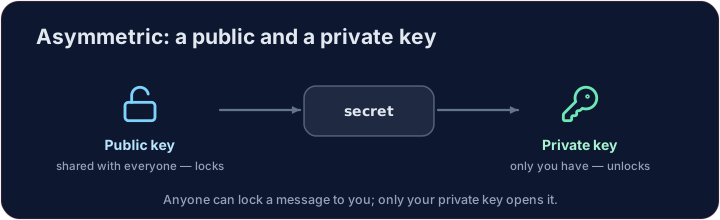
The padlock idea
- Your public key is like an open padlock you hand out to everyone.
- Anyone can lock a message shut with it — but only your private key can open it.
- So people send you secrets safely without ever sharing a secret key. That is the breakthrough.
“挂锁”的思路
- 你的公钥就像一把敞开的挂锁,你把它发给所有人。
- 任何人都能用它把消息锁上 —— 但只有你的私钥能打开它。
- 于是别人可以安全地给你发秘密,而从不需要共享一把密钥。这正是突破所在。
A tiny RSA
- RSA is real asymmetric encryption. With tiny numbers you can see it work:
- Encrypting and decrypting use different keys, yet the message comes back.
一个微型 RSA
- RSA 是真正的非对称加密。用很小的数字,你就能看到它运转:
n, e, d = 33, 3, 7      # public key (e, n), private key (d, n)
cipher = (7 ** e) % n   # lock 7 with the public key
print((cipher ** d) % n)   # unlock with the private key -> 7
- 加密和解密用的是不同的钥匙,消息却能完好还原。
Where you use it daily
- It also works in reverse for digital signatures (next lessons).
- Every time you see HTTPS, asymmetric encryption is quietly setting up a secure connection.
Covers: IGCSE 2.3 (asymmetric, public/private keys), A-Level 17.1, AP CSP.
你每天都在用它
- 它反过来用,还能实现数字签名(后面几课会讲)。
- 每当你看到 HTTPS,都是非对称加密在悄悄地建立一条安全连接。
涵盖:IGCSE 2.3(非对称、公钥 / 私钥)、A-Level 17.1、AP CSP。
Common mistakes
- A public key encrypts; only the matching private key decrypts.
- Never share the private key.
常见错误
- 公钥加密;只有配对的私钥能解密。
- 绝不要分享私钥。
Public & private keys · 公钥与私钥
Anyone encrypts with your public key; only your private key decrypts. · 任何人都能用你的公钥加密;只有你的私钥能解密。
Here is a tiny RSA with public key (e, n) and private key (d, n). Encrypt message with the public key (cipher = message**e % n), then decrypt with the private key (plain = cipher**d % n). Print plain — it should return to the original. · 这是一个微型 RSA,公钥为 (e, n),私钥为 (d, n)。用公钥加密 message(cipher = message**e % n),再用私钥解密(plain = cipher**d % n)。打印 plain —— 它应当还原成原始值。
Click Run to see the output here. · 点击“运行”查看此处输出。
The same keys also work in reverse — that is a digital signature. Sign with the private key (sig = message**d % n), then let anyone verify with the public key (sig**e % n). Print whether the verified value equals message. · 同一对密钥反过来也能用 —— 这就是数字签名。用私钥签名(sig = message**d % n),再让任何人用公钥验证(sig**e % n)。打印验证出的值是否等于 message。
Click Run to see the output here. · 点击“运行”查看此处输出。