Tables, keys and relationships
More than one table
Real databases split data across several tables. This lesson uses a small shop with two of them:
customer— one row per customer (id,name,city)orders— one row per order (id,customer_id,order_date,total)
Storing the customer's name on every order would repeat it again and again. Keeping customers in their own table stores each one once.
Primary keys
A primary key is the column that uniquely identifies each row. Design it to be non-NULL and never repeated. In SQLite, use INTEGER PRIMARY KEY for these integer ids, or explicitly add NOT NULL to a text primary key.
customer.idis the primary key ofcustomer.orders.idis the primary key oforders.
An existing primary-key value identifies exactly one row; a value not stored in the table identifies none.
Foreign keys
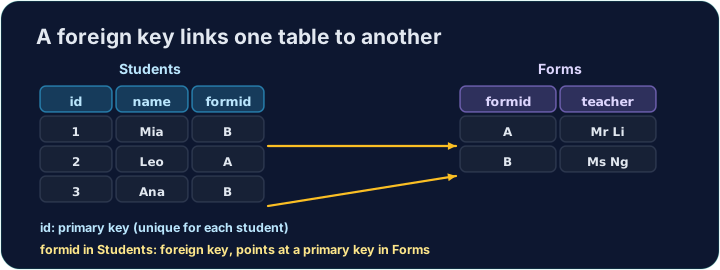
A foreign key is a column that holds the primary key of another table, linking the two.
orders.customer_id holds a value from customer.id — it says which customer each order belongs to.
With referential integrity enforced, each non-NULL foreign-key value must match a referenced key. An optional relationship may use NULL; add NOT NULL if every order must name a customer. SQLite requires PRAGMA foreign_keys = ON; on each connection to enforce declared foreign keys.
Common mistakes
- Do not assume every SQLite primary-key declaration rejects NULL; choose the declaration deliberately.
- A foreign key may reference a primary key or a suitable UNIQUE key, including one in the same table.
Keys link two tables
A shared key lets a row in one table point to a row in another.
Difficulty 2/5 · 140 coins + a small bonus on first completion today
Show the whole customer table so you can see the rows and their primary key id.
Click Run to see the output here.
Difficulty 2/5 · 140 coins + a small bonus on first completion today
Show each order's id, its customer_id (the foreign key), and its total, ordered by id.
Click Run to see the output here.