Counting and averaging
This page needs a recent browser (with SharedArrayBuffer support). Please update Chrome, Edge, Firefox or Safari to the latest version.
Summarising with aggregate functions
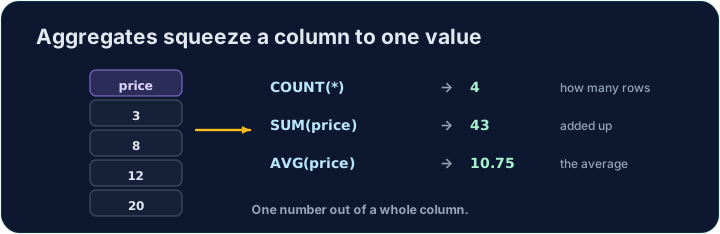
Sometimes you do not want the rows themselves, but a summary of them. Aggregate functions turn many rows into a single value:
COUNT(*)— how many rowsSUM(col)— the totalAVG(col)— the averageMIN(col)/MAX(col)— the smallest / largest
SELECT COUNT(*) FROM student;
Naming and rounding the result
Give the result a clear heading with AS. Averages often have long decimals, so wrap them in ROUND(value, 2) to keep 2 decimal places:
SELECT COUNT(*) AS n, ROUND(AVG(score), 2) AS avg_score
FROM student;
You can combine several aggregates in one query.
Common mistakes
COUNT(*)counts rows;AVG(col)averages a column.- Round an average with
ROUND(x, 2).
Difficulty 2/5 · 140 coins + a small bonus on first completion today
In one query, show how many students there are as n, and their average score (to 2 decimal places) as avg_score.
Click Run to see the output here.
Difficulty 2/5 · 140 coins + a small bonus on first completion today
Show the lowest score as lowest, the highest as highest, and the total of all scores as total.
Click Run to see the output here.