INPUT and data types
This page needs a recent browser (with SharedArrayBuffer support). Please update Chrome, Edge, Firefox or Safari to the latest version.
INPUT reads what the user types
INPUTreads one line the user types and stores it in a variable.- Pair it with
OUTPUTto talk to the user.
INPUT Name
OUTPUT "Hello, ", Name
DECLARE the type so numbers work
- Text typed in is a string by default.
DECLAREa variable asINTEGER(orREAL) soINPUTreads a number.
DECLARE Age : INTEGER
INPUT Age
OUTPUT Age + 1
The five data types
- Every value has a type. You'll use five main types (A-Level 9618 adds a sixth, DATE).
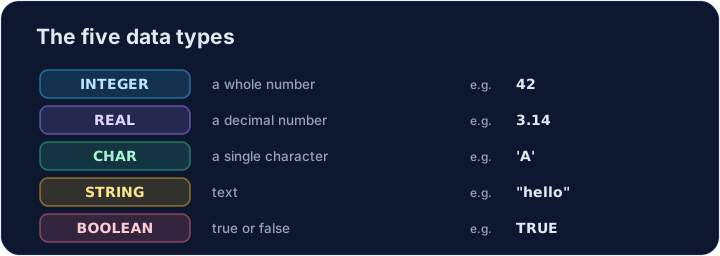
DECLARE Price : REAL
DECLARE Letter : CHAR
DECLARE Passed : BOOLEAN
Watch out
- Without
DECLARE ... : INTEGER,INPUTkeeps the value as a string, soAge + 1would fail. CHARholds one character in single quotes ('A');STRINGholds many in double quotes.
Common mistakes
INPUT xreads a value intox.- Choose the right type: INTEGER, REAL, STRING, BOOLEAN or CHAR.
Now you try
- Each task reads one input with
INPUT. - Press Check answer to test it.
Read a name with INPUT, then output Hi, followed by the name. For input Sam, output Hi, Sam.
Click Run to see the output here.
DECLARE N as INTEGER, read it with INPUT, then output N + 1. For input 9, output 10.
Click Run to see the output here.
Read an INTEGER N, then output N doubled (times 2). For input 6, output 12.
Click Run to see the output here.