Sections and titles
This page needs a recent browser (with SharedArrayBuffer support). Please update Chrome, Edge, Firefox or Safari to the latest version.
Organising with sections
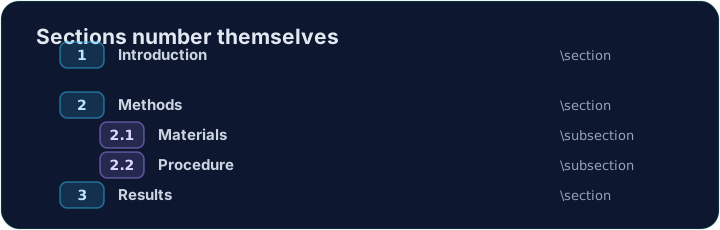
- Real documents are split into sections so readers can follow them.
- The command is simple:
\section{Introduction}
- LaTeX numbers it automatically (1, 2, 3 …) — you never count by hand.
Smaller pieces
- Inside a section you can add subsections:
\section{Methods}
\subsection{Materials}
\subsection{Procedure}
- These become 2.1, 2.2, and so on. Add or remove one and everything renumbers itself.
A title block
- A report usually starts with a title, an author, and a date.
- You declare them in the preamble, then print them with
\maketitle:
\documentclass{article}
\title{My First Report}
\author{Pat Lee}
\begin{document}
\maketitle
...
\end{document}
\maketitlemust go inside the body, as its first line.
Common mistakes
\section{...}numbers automatically; use\section*{...}for no number.\maketitleneeds\title{...}and\author{...}set first.
Difficulty 1/5 · 100 coins + a small bonus on first completion today
Organise this report by adding a section heading. Put \section{Introduction} at the start of the body, then Run. Notice LaTeX numbers it for you.
Click Run to compile and preview the PDF.
Difficulty 1/5 · 100 coins + a small bonus on first completion today
Give the document a title block. Add \title{...} and \author{...} in the preamble, then \maketitle as the first line of the body.
Click Run to compile and preview the PDF.