SQL injection
This page needs a recent browser (with SharedArrayBuffer support). Please update Chrome, Edge, Firefox or Safari to the latest version.
When input becomes a command
- Many apps build a database query by gluing the user's input into a string. That is dangerous.
- If an attacker types SQL as their input, it can become part of the query. This is SQL injection — the most famous web attack.
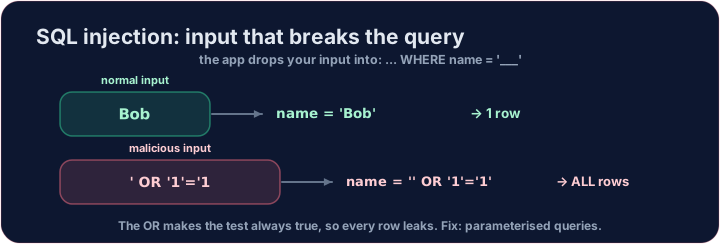
See the attack
- Imagine a login that checks
... WHERE name = '<whatever you typed>'. - An attacker types
' OR '1'='1as the name. The query becomes:
SELECT * FROM users WHERE name = '' OR '1'='1';
'1'='1'is always true, so the database returns every user. The login is bypassed. Run it and see.
The fix: parameterised queries
- Never glue user input into SQL. Use parameterised queries (also called prepared statements).
- The database treats the input strictly as a value, never as code — so
' OR '1'='1is just a (failed) name to look up. - Also apply least privilege: the web app's database account should only do what it needs.
Your turn
- Below, write a precise, safe query that returns only bob by his
id. That is the spirit of a parameterised lookup.
Covers: A-Level data security; web application security.
Common mistakes
- Never build a query by joining raw user input into the text.
- Use parameterised queries so input can never change the query.
Difficulty 3/5 · 200 coins + a small bonus on first completion today
First, run the attack and see the damage. The app glued the attacker's input into the query, so the condition became name = '' OR '1'='1'. Complete the query exactly like that and see every user leak out.
Click Run to see the output here.
Difficulty 3/5 · 200 coins + a small bonus on first completion today
A safe lookup uses a precise condition. Change the query to return only bob's row, by adding WHERE id = 2.
Click Run to see the output here.