Bits, binary, and bitwise operators
This page needs a recent browser (with SharedArrayBuffer support). Please update Chrome, Edge, Firefox or Safari to the latest version.
Numbers are bits
- Inside the computer, every
intis a row of bits — each bit is a0or a1. - We usually read numbers in base 10, but the machine stores them in base 2 (binary).
- Bitwise operators let you look at and change individual bits.
Place value and powers of two
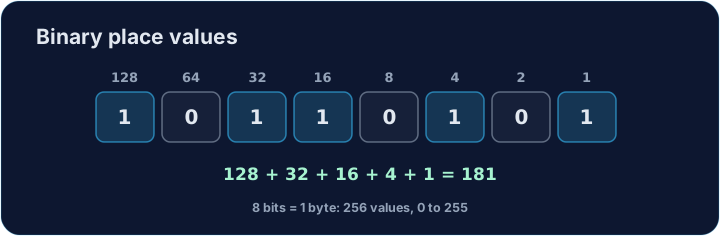
- In binary, each position is a power of two: 1, 2, 4, 8, 16, ...
- The byte
00010100is16 + 4 = 20. The rightmost bit is the 1s place. - An 8-bit byte can hold
0to255.
Reading a bit with >> and & 1
- The shift
n >> imoves the bits right byiplaces, so bitilands in the 1s place. - The mask
& 1keeps only that lowest bit, giving0or1. - So
(n >> i) & 1reads the value of bit numberi.
The bitwise operators
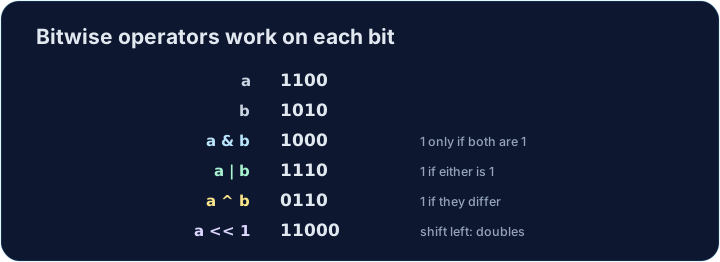
&(and),|(or),^(xor),~(not) combine numbers bit by bit.<<and>>shift bits left or right. Shifting left by 1 doubles a number.- These are the tools for masks, flags, and low-level tricks.
#include <stdio.h>

int main(void) {
    int n = 20;
    for (int i = 7; i >= 0; i--) {   // from the highest bit down
        printf("%d", (n >> i) & 1);
    }
    printf("\n");                    // 00010100
    return 0;
}
Common mistakes
&is bitwise AND and&&is logical AND — do not confuse them.<< 1doubles a value;>> 1halves it.
Now you try
- Use
(n >> i) & 1to read biti, and a loop to look at every bit. - For
count_bitsandget_bit, the parameter isunsigned int. Do not write amainfor those.
Explore
Bitwise operators
& | ^ ~ << >> work on each bit of a byte independently.
Difficulty 3/5 · 200 coins + a small bonus on first completion today
Complete int count_bits(unsigned int n) so it returns how many bits of n are 1. Use & 1 and >> in a loop. Do not write a main.
Click Run to see the output here.
Difficulty 3/5 · 200 coins + a small bonus on first completion today
Complete int get_bit(unsigned int n, int i) so it returns bit number i of n (0 or 1). Use (n >> i) & 1. Do not write a main.
Click Run to see the output here.
Difficulty 3/5 · 200 coins + a small bonus on first completion today
The byte n is given. In main, print its 8-bit binary form (most significant bit first), then a newline. For 20 that is 00010100.
Click Run to see the output here.