Text files: write and read with Scanner
This page needs a recent browser (with SharedArrayBuffer support). Please update Chrome, Edge, Firefox or Safari to the latest version.
Reading and writing text files
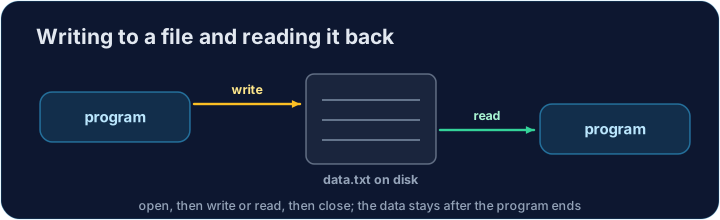
- A text file stores text that stays on disk after the program ends.
- To read a file in Java we use a
Scannerconnected to aFile. - To write a file we use a
PrintWriter. In this lesson each program writes a file, then reads it back. - Bonus lesson: the AP CSA exam does not test file input/output. Learn this for real programs — you will not be examined on it.
Explore
Reading and writing a file
A file is used in three steps: open it, read or write lines, then close it.
The imports you need
- File tools live in two places, so we import both at the top.
import java.io.*;— forFile,PrintWriter, andIOException.import java.util.Scanner;— for theScannerreader.
import java.io.*;
import java.util.Scanner;
Files can fail, so we say throws IOException
- Reading or writing a file can go wrong (the file may be missing).
- Java makes you handle this. The simplest way is to add
throws IOExceptiontomain. - This says "if a file error happens, let the program stop". That is fine for these tasks.
Writing a file with PrintWriter
new PrintWriter("data.txt")makes (or empties) a file calleddata.txt.- Use
writer.println(...)to write one line, just like printing to the screen. - Always call
writer.close()when you finish, so the text is saved.
import java.io.*;

public class WriteDemo {
    public static void main(String[] args) throws IOException {
        PrintWriter writer = new PrintWriter("data.txt");
        writer.println(10);
        writer.println(20);
        writer.close();           // save the file
        System.out.println("wrote data.txt");
    }
}
Reading numbers with Scanner
new Scanner(new File("data.txt"))opens the file for reading.in.hasNextInt()istruewhile there is another whole number to read.in.nextInt()reads the next whole number. Callin.close()when done.
import java.io.*;
import java.util.Scanner;

public class ReadNumbers {
    public static void main(String[] args) throws IOException {
        Scanner in = new Scanner(new File("data.txt"));
        int total = 0;
        while (in.hasNextInt()) {     // more numbers?
            total = total + in.nextInt();
        }
        in.close();
        System.out.println(total);
    }
}
Reading whole lines
- Sometimes a line is text, not a number. Then read lines instead.
in.hasNextLine()istruewhile there is another line.in.nextLine()reads the whole next line as aString.
import java.io.*;
import java.util.Scanner;

public class ReadLines {
    public static void main(String[] args) throws IOException {
        Scanner in = new Scanner(new File("data.txt"));
        while (in.hasNextLine()) {
            String line = in.nextLine();
            System.out.println("read: " + line);
        }
        in.close();
    }
}
hasNext()(noIntorLine) checks for the next word, andnext()reads one word.- The pattern is always: check with a
hasNext...method, then read with the matching method.
Write then read in one program
- In each task your program first writes a file, then reads the same file back.
- This means you can run it again and again and get the same result.
import java.io.*;
import java.util.Scanner;

public class RoundTrip {
    public static void main(String[] args) throws IOException {
        PrintWriter writer = new PrintWriter("data.txt");
        writer.println(3);
        writer.println(4);
        writer.close();

        Scanner in = new Scanner(new File("data.txt"));
        int total = 0;
        while (in.hasNextInt()) {
            total = total + in.nextInt();
        }
        in.close();
        System.out.println(total);   // 7
    }
}
Common mistakes
nextInt()leaves the newline, so a followingnextLine()reads an empty line.- Check
hasNext()before reading to avoid running off the end.
Now you try
- Each task pre-fills a class. Write the file first, then read it back, as the prompt asks.
- Remember the
throws IOExceptiononmain, andclose()both the writer and theScanner. - Press Run to compile and run, then Check answer.
Difficulty 3/5 · 200 coins + a small bonus on first completion today
First write the numbers 10, 20, 5, 7 to data.txt (one per line) with a PrintWriter. Then open it with new Scanner(new File("data.txt")) and use hasNextInt/nextInt to add them up. Print only the total. Expected output: 42.
Click Run to see the output here.
Difficulty 3/5 · 200 coins + a small bonus on first completion today
First write the lines apple, banana, cherry to words.txt with a PrintWriter. Then open it with a Scanner and use hasNextLine/nextLine to count the lines. Print only the count. Expected output: 3.
Click Run to see the output here.