2-D arrays: working with a grid
This page needs a recent browser (with SharedArrayBuffer support). Please update Chrome, Edge, Firefox or Safari to the latest version.
A grid of values
- A normal array is a single row of values.
- A 2-D array is a grid: it has rows and columns, like a table or a spreadsheet.
- We use it for game boards, images, tables of marks, and more.
Making a 2-D array
int[][] g = new int[3][4];makes a grid with 3 rows and 4 columns.- Every cell starts at
0(forint). - You can also fill it directly with values inside
{...}.
public class Main {
    public static void main(String[] args) {
        int[][] g = new int[3][4];   // 3 rows, 4 columns, all 0

        int[][] table = {
            {1, 2, 3},
            {4, 5, 6}
        };   // 2 rows, 3 columns
        System.out.println(table[0][2]);   // 3
        System.out.println(table[1][0]);   // 4
    }
}
Reading and writing one cell
- A cell needs two indexes:
g[row][col]. Row first, then column. - Both indexes start at 0.
g[1][2] = 9;stores9in row1, column2.
public class Main {
    public static void main(String[] args) {
        int[][] g = new int[2][2];
        g[0][0] = 5;
        g[0][1] = 7;
        g[1][0] = 9;
        g[1][1] = 11;
        System.out.println(g[1][0]);   // 9
        g[1][0] = g[1][0] + 1;
        System.out.println(g[1][0]);   // 10
    }
}
How big is the grid?
g.length— the number of rows.g[0].length— the number of columns in row0.- In AP CSA every row has the same length, so
g[0].lengthis the column count for the whole grid.
public class Main {
    public static void main(String[] args) {
        int[][] g = {
            {1, 2, 3},
            {4, 5, 6}
        };
        System.out.println(g.length);      // 2 rows
        System.out.println(g[0].length);   // 3 columns
    }
}
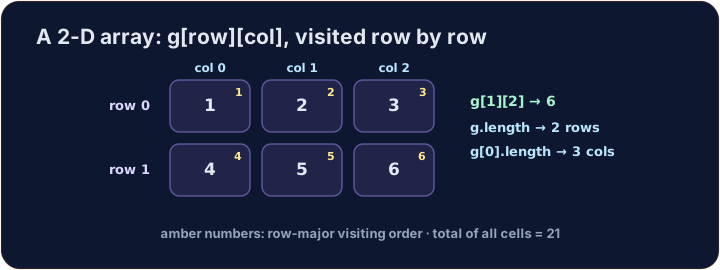
Row-major traversal
- To visit every cell, use a loop inside a loop.
- The outer loop picks the row
r. The inner loop picks the columnc. - This visits row
0fully, then row1, and so on. This order is called row-major.
public class Main {
    public static void main(String[] args) {
        int[][] g = {
            {1, 2, 3},
            {4, 5, 6}
        };
        int total = 0;
        for (int r = 0; r < g.length; r++) {
            for (int c = 0; c < g[0].length; c++) {
                total = total + g[r][c];
            }
        }
        System.out.println(total);   // 21
    }
}
Common mistakes
- Index a grid
grid[row][col]. grid.lengthis the number of rows;grid[0].lengthis the columns.
Now you try
- Each task pre-fills the class skeleton — write your code inside main, or complete the method shown.
- For a complete program, Run compiles and runs it. For a method or class task, Check answer compiles your code with the supplied tests and shows the results.
- Your code compiles and runs on the server, so even the first run is fast.
Explore
A 2-D array is a grid
A 2-D array is rows × columns; reach a cell with a[row][col].
Difficulty 3/5 · 200 coins + a small bonus on first completion today
Complete sumGrid(int[][] g) so it returns the total of every cell in the grid. Use a nested loop with g.length rows and g[0].length columns.
Click Run to see the output here.
Difficulty 3/5 · 200 coins + a small bonus on first completion today
Complete rowSum(int[][] g, int r) so it returns the total of the cells in row r only. Loop over the columns of that one row.
Click Run to see the output here.
Difficulty 3/5 · 200 coins + a small bonus on first completion today
In main, the grid is given. Print each row on its own line, with the numbers joined by a single space. For the grid shown, the output is 1 2 3 then 4 5 6. (Build each line in row-major order, then println it.)
Click Run to see the output here.